
Grading criteria
Grading criteria are the standards you grade photographers on after each event, such as "Arrived on time" or "Covered the finish line". Each one can add a bonus, and they all appear in the post event email.
Add a criterion
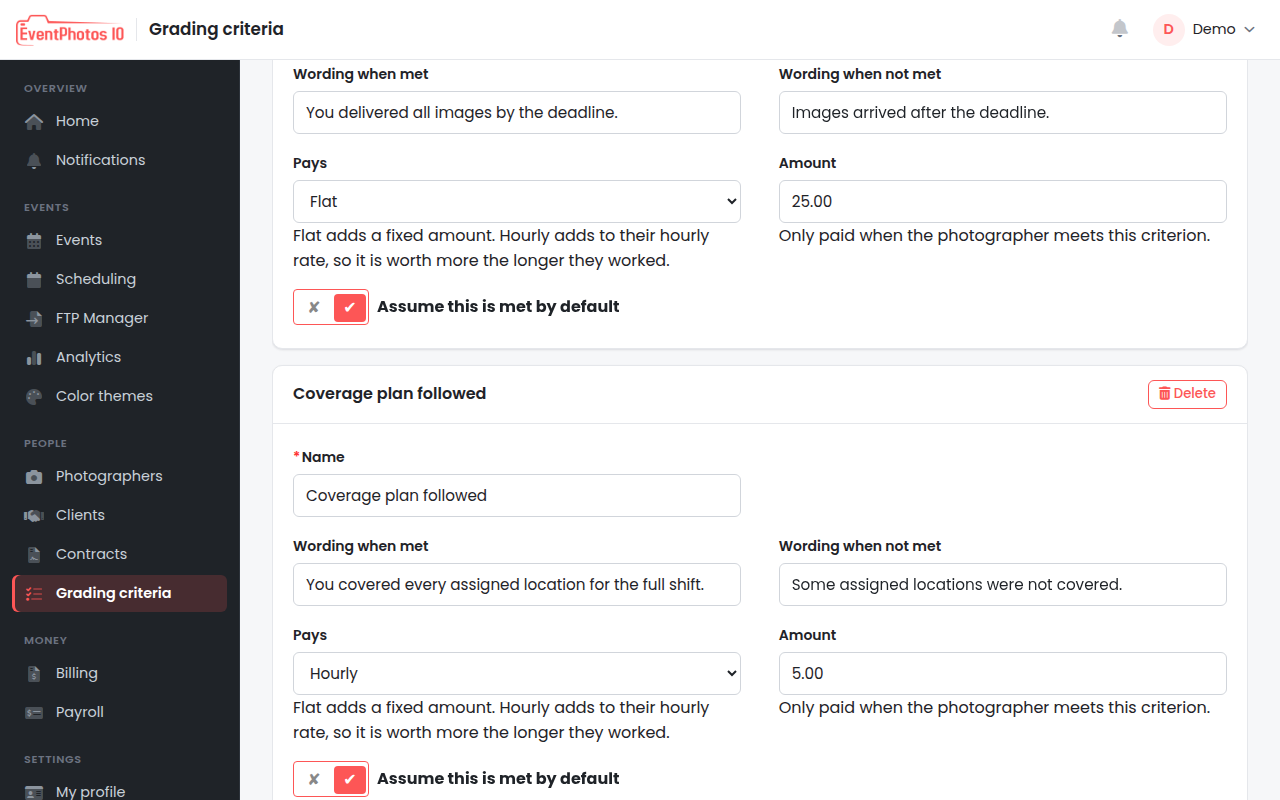
- Open Grading criteria and click Add criterion.
- Enter a Name of up to 64 characters.
- Write the Wording when met and Wording when not met (up to 255 characters each). This is what the photographer reads.
- Choose what it Pays:
- None;
- Flat: adds a fixed amount;
- Hourly: adds to the hourly rate.
- Enter the Amount (0 to 10,000). It's only paid when the criterion is met.
- Turn on Assume this is met by default if most photographers usually meet it.
- Click Save criteria.
How it's used in payroll
In each event's payroll, every criterion is marked ✔ met, ✘ not met, or – not applicable.
- Hourly bonuses raise the rate before it's multiplied by the hours.
- Flat bonuses are added afterwards.
- Unmet criteria never take pay away.
- "Not applicable" leaves the criterion out of the pay and the email.
Tips
- Each payroll keeps its own copy of the wording. Once an email is sent, editing a criterion doesn't change it.
- Deleting a criterion doesn't change emails that were already sent.