
Payroll
Run payroll one event at a time. Hours come from each photographer's first and last photo, and you add rates, expenses and bonuses. Then send each photographer a post event email.
1. Open the event's payroll
- Open Payroll and choose the year. Only past events are listed.
- Click Run Payroll, or View Payroll if it's been run before.
Everyone assigned to the event is included, plus anyone who uploaded photos to it.
2. Check and adjust
For each photographer:
- Pay start and Pay end default to their first and last kept frame. Kept frames include hidden and restricted photos and photos in the trash; photos deleted for good are left out. Change them if needed.
- Hours worked ends at the last frame taken. Hours paid ends at the pay end and counts kept frames only.
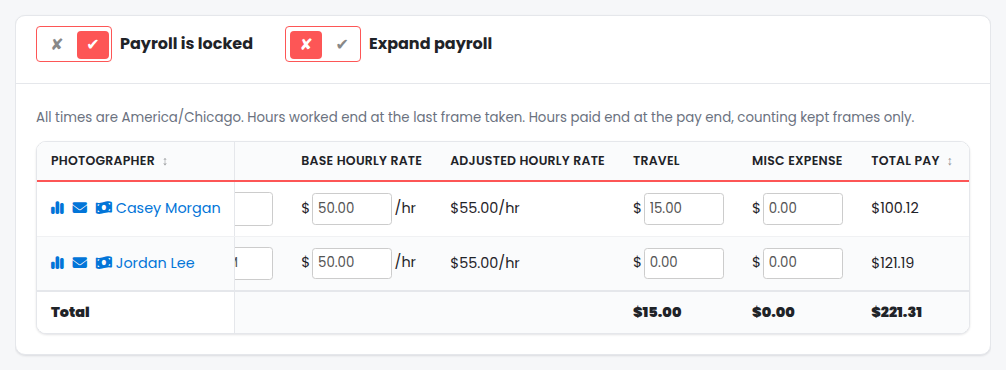
- Set the Base hourly rate (the default is $50.00), Travel and Misc expense.
- Mark each grading criterion as ✔, ✘ or –.
- Check the Payment method. It starts as their preferred method.
Total pay = hours paid × (base rate + hourly bonuses) + flat bonuses + travel + misc.
3. Save and lock
Click Recalculate hours and save payroll. This saves and locks the payroll so the figures don't change if photos are deleted later. Once a photographer's post event email has been sent, their figures stay frozen even if you unlock and recalculate: photos deleted after that point are still counted. While locked, the payroll fields are greyed out. To make changes, turn off Lock payroll. You'll be warned if it's already been run.
4. Send the post event email
- Click the envelope icon next to a photographer.
- Fill in Pay ETA, the Payment method, Notes and individualized feedback and an optional private Rating.
- Click Save and update preview, check the preview, then Send this email.
The email includes the pay breakdown, your criteria and notes, their statistics, a link to their report, a link to their contracts and a fresh link to update their payment methods. Replies come to your email. You can resend after 15 minutes.
Tip
The private rating is saved to the photographer's ratings but never shown to them.